My Team
For: Members
If your studio set you up as the owner of a group membership — like a company covering its employees or a household on one family plan — My team is where you manage it. You can see who's covered, invite new people, and keep your seats up to date, all without asking your studio.
You only see My team if you own a group. If you're covered by someone else's group, you don't manage it here — your membership just works like any other.
Key Concepts
| Concept | Description |
|---|---|
| Group | One membership that covers several people — a company (corporate) or a household (family). |
| Owner | The one person who pays for the group and manages it. That's you. |
| Member | Someone covered by the group. They have their own membership, but you pay. |
| Seat | One spot in the group. Your plan may cap how many seats you have (for example, 3 of 10 used). |
| Pending invitation | Someone you've invited who hasn't joined yet. |
How it works
- You own the group. You're set up as the owner — either by your studio (a company group) or by signing up for a family membership yourself — with your plan and seat limit.
- You invite people by email. Each person gets a secure link to join. On a family group you can also add a child yourself.
- They join. If they don't have a ClassLift account yet, they create one from the link and sign any documents your studio requires — then they're covered.
- What you pay depends on your plan. Everyone you cover is billed to you, not to them. On a family plan you pay one flat rate up to your seat limit — adding or removing people doesn't change it. On a company (per-seat) plan, your bill follows how many members you cover, adjusting automatically as people join or leave.
How people join
When you invite someone, they get an email with a join link. Opening it shows them your group, confirms there's nothing for them to pay, asks for their Date of birth (required) and Phone (optional), and asks them to sign any required documents before joining.
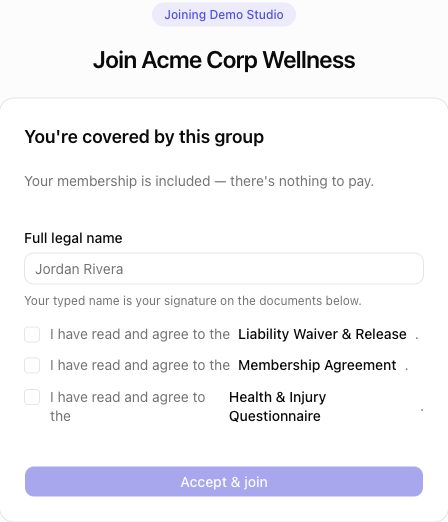
New people can create their account right from this page — they don't need one beforehand.
Where to find it
- In the app or web portal: open Account → My team. If you own more than one group, pick the one you want to manage.
Learn More
- Managing your group — invite, remove, hand over, or cancel
- Examples — real-world group situations