Your public site
For: Owners & Managers
Every studio gets a public page — a simple, mobile-friendly site where prospective members can see your plans and schedule and join in a couple of minutes. It lives at your studio's web address and is built automatically from what's already in ClassLift.
Key Concepts
| Concept | Description |
|---|---|
| Public site | Your studio's public join page, at yourstudio.classlift.app. |
| Web address | Your subdomain — shown on Settings → Organization (it isn't editable in the app). |
| Auto-generated | The page builds itself from your logo, name, published plans, upcoming classes, and active locations — there's nothing separate to design. |
| Join | The path a visitor takes from your page to become a paying member. |
What visitors see
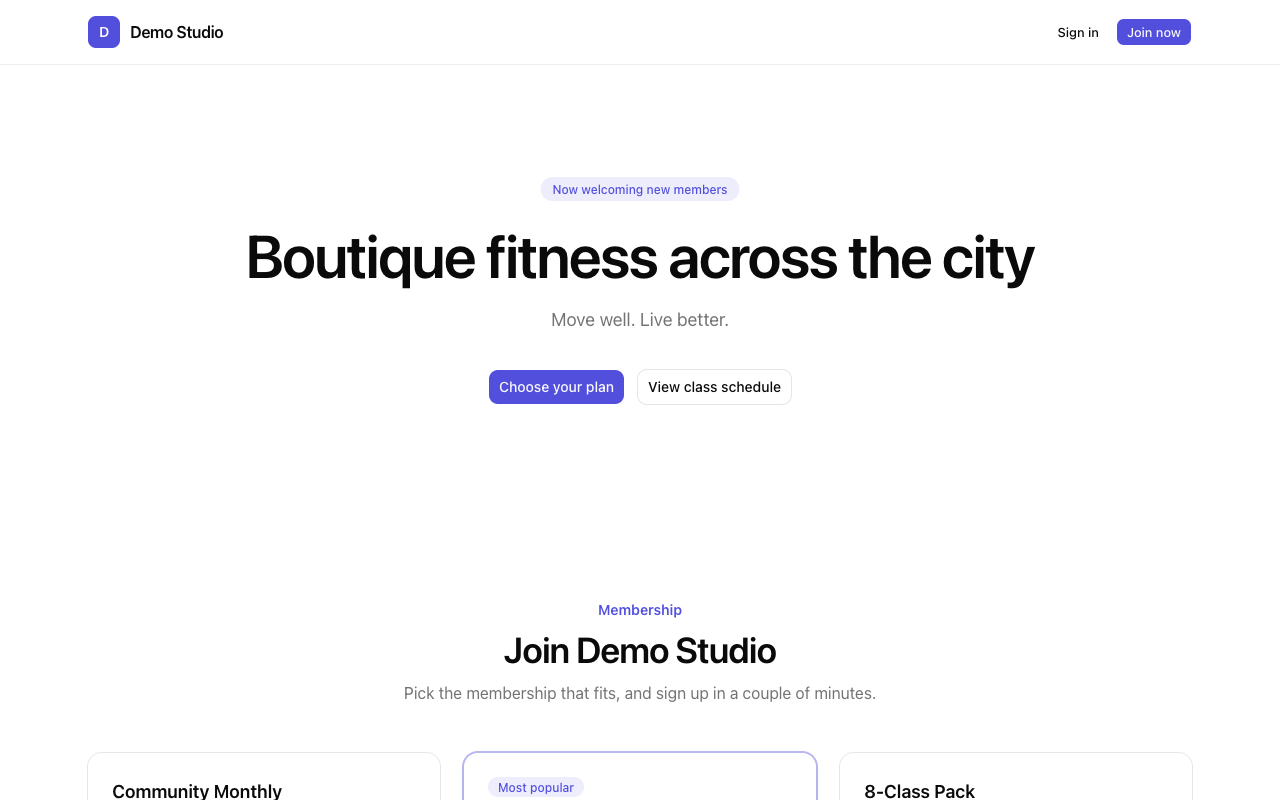
Your public page is a single scrolling page with these sections:
- Header — your logo and name, with Sign in and Join now.
- Hero — a welcome headline and the Choose your plan and View class schedule buttons.
- Membership — your plans, cheapest first, each with a Join now button. The plan you featured is badged Most popular.
- Upcoming classes — the next classes on your schedule.
- Locations — where to find you.
- A closing call to action to choose a plan, and a Powered by ClassLift footer.
How it works
- You set up your studio in ClassLift — logo, name, plans, schedule, locations.
- ClassLift publishes your page automatically at your web address.
- A visitor browses your plans and schedule and clicks Join now.
- They create an account and join on the plan they picked — and they're a member.
Where to find it
- Your page: open
yourstudio.classlift.app(your web address is shown on Settings → Organization).
Learn More
- Managing your public page — the levers that shape what appears
- Examples — real-world public-page setups
- Related: Organization settings · Membership Plans