The member directory
For: Owners, Managers & Front-desk Staff
The Directory lists everyone with a membership at your studio. Use it to look people up, check their status at a glance, invite new members, and open anyone's profile.
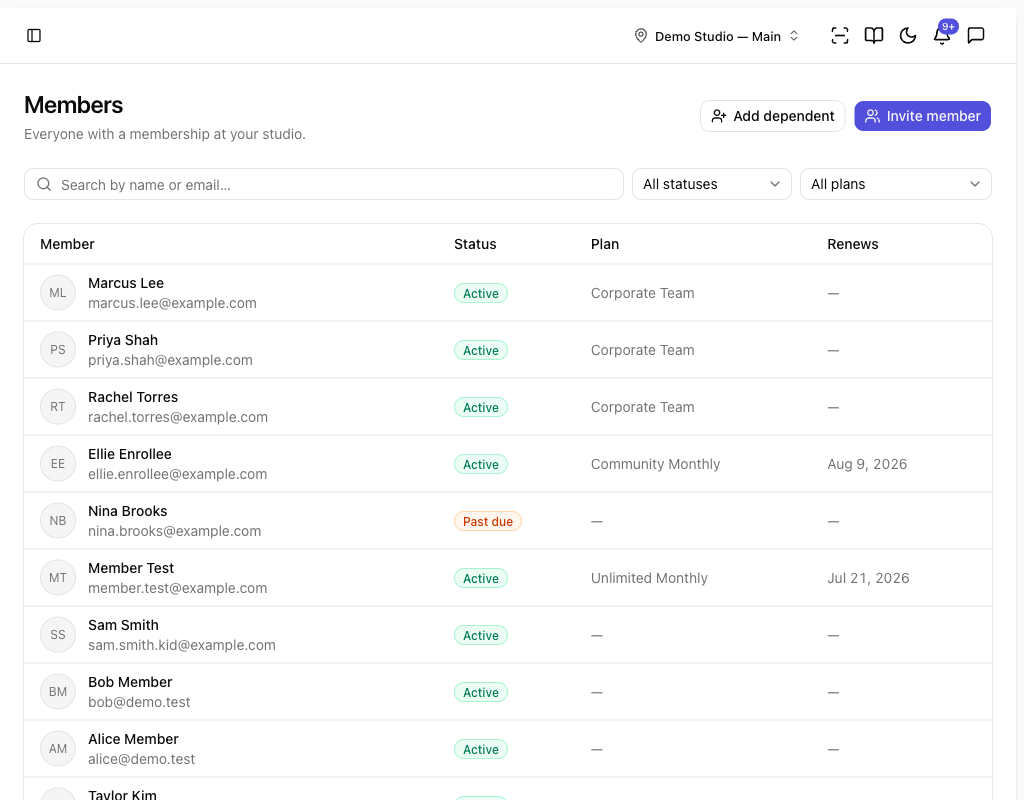
Finding a member
- Go to Members → Directory.
- Type a name or email into Search by name or email….
- Narrow the list with the filters:
- Status — All statuses, Active, Frozen, Past due, or Cancelled.
- Plan — show only members on a particular plan.
- Click anyone's row to open their profile.
The table shows each member's Member (name, email, and phone), Status, Plan, and Renews date. A member's phone appears under their email when it's on record; open a profile to see their full contact details and date of birth. Use Load more to page through a long list.
What the statuses mean
| Status | Meaning |
|---|---|
| Active | The membership is live and in good standing. |
| Frozen | Temporarily paused — billing is on hold and access is withdrawn. |
| Past due | A payment failed; the membership needs attention. |
| Cancelled | Ended. History is kept for your records. |
Inviting a member
- Click Invite member.
- Enter the person's Email and choose a Plan.
- Click Send invitation.
They get an email link to join on that plan, confirm their own details — including their Date of birth (required) and Phone (optional) — and sign any required waivers before their membership starts. (No active plans yet? Create one first under Plans — a $0 plan works for drop-ins and trials.)
Adding a dependent
To add a child or other dependent who has no email of their own, click Add dependent and follow the guardian-linked flow — see Dependents and guardians.
Tips
- A dependent shows Dependent · no login under their name — they're managed by a guardian, not by a login of their own.
- Use the Plan filter to pull a clean list before a price change or a class launch.
Troubleshooting
| Issue | What to do |
|---|---|
| A new invite isn't in the list | Invited members appear once they accept and their membership starts. |
| I can't find a cancelled member | Set Status to Cancelled — cancelled members are kept for your records. |
| Invite member has no plans to choose | Create an active plan first under Plans. |