Messaging
For: Owners, Managers, Front-desk Staff & Instructors
Message members and teammates directly from the chat dock in your top bar — answer a member's question, follow up on a booking, or coordinate with a colleague, without leaving the page you're on.
Key Concepts
| Concept | Description |
|---|---|
| Chat dock | The messaging panel that opens from the Messages icon in the top bar. |
| Conversation | A direct or group chat. Staff can message anyone at the studio — members or teammates. |
| Unread badge | A count on the Messages icon showing how many conversations have unread messages. |
| Announcement | A one-to-many broadcast to everyone in your studio — sent from the Notifications panel, not the chat dock. See Announcements & campaigns. |
Opening the chat dock
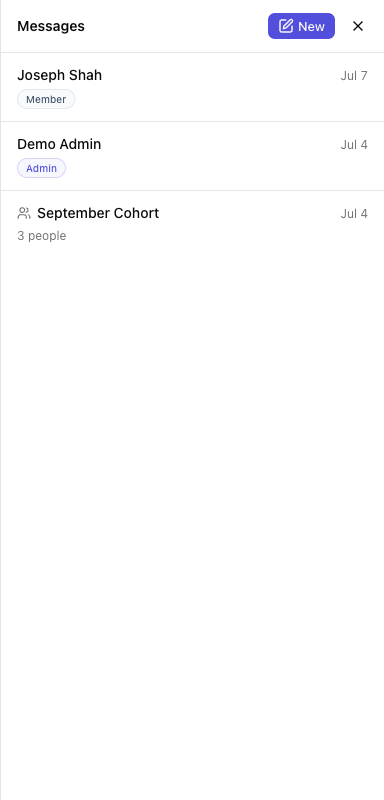
Click the Messages icon in the top bar. The dock opens on the right and shows your conversations; the icon carries an unread count when members or teammates have written to you.
Starting a conversation
- In the dock, click New.
- On New message, search under To (Search people…) and pick a recipient. Add more than one to start a group, with an optional Group name.
- Write your note under Message and click Send message. You'll see Message sent.
Recipients show a role badge — Owner, Admin, Instructor, Staff, or Member — so you know who you're writing to.
Replying
Open a conversation, type in the box (Write a message…), and press Enter (or click Send). Shift+Enter adds a new line. Members see your replies in their own Messages.
Tips
- Members can message your team any time — keep an eye on the unread badge so questions don't sit.
- Use a group to bring a coach and a manager into the same thread with a member.
Learn More
- Announcements & campaigns — broadcast to everyone at once, or to a targeted list
- Examples — real-world staff messaging situations
- For members: Messages & notifications
Note: The chat dock is for one-to-one and group conversations. To reach many members at once, send an announcement instead — it gives each person their own copy, with no shared thread.