Dependents and guardians
For: Owners, Managers & Front-desk Staff
A dependent — typically a child — is a member with no email or login of their own, managed by a guardian. You set dependents up from the back office; the guardian then books and checks them in from their own app. This page covers adding a dependent, setting guardian permissions, recording consent, and letting a dependent claim their own account.
Adding a dependent
You can start from Members → Directory → Add dependent, or from a guardian's profile on the Family tab under Dependents → Add dependent.
- Choose the Guardian (search by name or email).
- Enter the Dependent's name and Date of birth.
- Set the Relationship — Parent, Guardian, or Other.
- Set the Guardian permission:
- Manage (book, check-in, sign) — full management, including signing waivers.
- Pickup only (check-in) — can only check the dependent in.
- Optionally seat the dependent in a Family group.
- Click Add dependent.
The guardian signs any required waivers to activate the dependent's membership. On the dependent's Documents tab, Sign as guardian shows the full document text, then asks the guardian to type their own legal name — the signature is recorded as theirs, on the dependent's behalf.
The Family tab
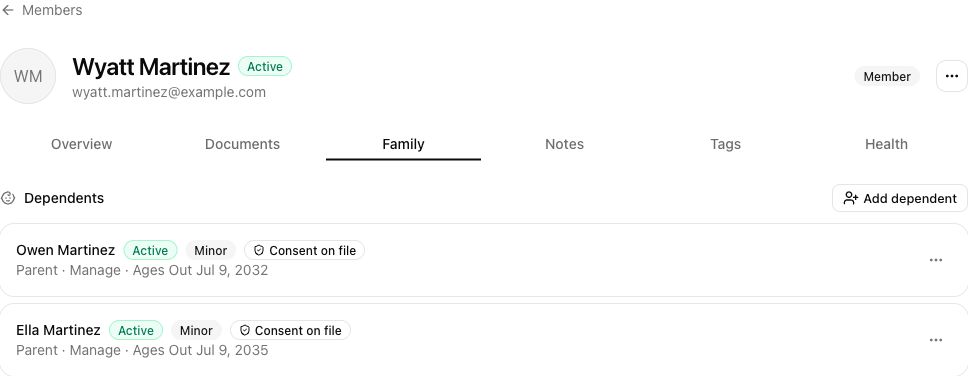
On a member's Family tab you'll see two sections:
- Dependents — everyone this member guards. Each shows a status, a Minor badge, a Consent on file badge, and the relationship and permission (for example Parent · Manage).
- Guardians — for a dependent, who's set up to act for them. The main guardian is marked Primary.
Use a grant's ⋯ menu to change things:
| Action | What it does |
|---|---|
| Set to Manage / Set to Pickup-only | Change what a guardian can do. |
| Record parental consent… | Record verifiable parental consent (credit-card, signed form, government ID, or knowledge-based check). |
| Enable login… | Give a dependent their own email login (needs consent first). |
| Remove guardianship | End a guardian's relationship to the dependent. |
Letting a dependent claim their own account
When a child grows up, open their Family tab and use Claim account… to move them to their own email login and a standalone membership.
Tips
- Use Pickup only for a caregiver who should be able to check a child in but not change bookings or sign forms.
- Record parental consent before enabling a login for a minor — the Enable login action requires it.
Troubleshooting
| Issue | What to do |
|---|---|
| A dependent's membership is still pending | The guardian needs to sign the required waiver — see the Documents tab. |
| Enable login is disabled | Record parental consent first (Record parental consent…). |
| The guardian can't check the dependent in | Confirm the guardian's permission is Manage or Pickup only, not removed. |